
How Commercial Video Surveillance Works Alongside Security Guards
If guards are your main line of defense, you already know the limit: one person can only be in one place at a time, and most of what matters at a busy facility happens somewhere else. That gap is how a side door propped open after a shift change, or a truck backing into the wrong bay, can go unseen for hours. Cameras cover those places all day and all night, and they turn what happened into something you can watch instead of argue about.
That is why we treat a commercial video surveillance system as a partner to your people, not a replacement for them. Our cameras give your staff a clear view of every location from one dashboard, and they give you footage you can rely on when an insurer or the police ask what took place. Because the system is part of our wider commercial security solutions, it also connects to your doors and alarms, so what you see on video lines up with who came through which entrance.


Dome and Bullet Cameras
For a lobby or an office, you want a camera that sees detail without drawing the eye, and a dome camera usually fits. Meanwhile, smaller mini versions fit the tight spaces where a full-size camera would not. Bullet cameras are built for detailed monitoring, so we put them where you need more detail, such as exterior walls and gates.
Multisensor and 360 Cameras
A wide-open warehouse floor or a long corridor can take four cameras to cover, and four cameras mean four things to wire and maintain. Multisensor cameras put two or four sensors in one unit, so a single mount can watch several directions, and four-sensor models can cover a full 360 degrees.
Fisheye cameras mount on the ceiling and can capture up to 360 degrees in a single view, which works well in open rooms such as a lobby or a warehouse floor. When you need to read a plate or recognize a face at a distance, a bullet camera does that job better, so we pair them where both matter.
License Plate Recognition Cameras
If trucks queue at your gate, or you need to know which vehicles were on site last Tuesday, a plate reader does the logging for you. Bullet cameras suit the job because they are built for detailed monitoring at an entrance, and plates can be checked automatically against your own watchlists. We set these up at gates and lot approaches, and the same footage stays searchable by vehicle later.
Cloud-Based Video vs. Traditional DVR/NVR Systems
Most facility managers who have been through it can tell you the story. An incident happens, someone goes to pull the footage, and the recorder in the back closet has a failed drive or has been overwriting video for weeks. Traditional DVR and NVR systems keep your footage in one box that someone has to maintain and replace in person.
A cloud-managed system works differently. Each camera stores footage on the camera itself for 30 to 365 days, depending on the model, and you manage everything from a secure online dashboard, so your team doesn't have to maintain a recorder or server. You can pull up any camera from a browser or phone wherever you are, and software updates arrive over the air instead of waiting on a technician visit.
Smart Search and Real-Time Alerts
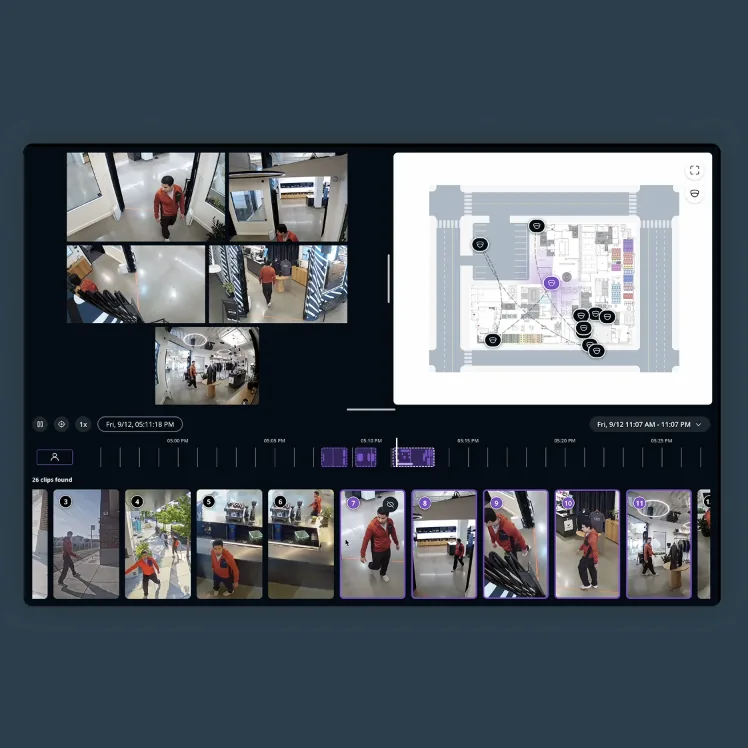
After an incident, nobody has hours to scroll through footage. Smart search lets you describe what you remember and find it across your cameras. Type something like “person in orange vest near dock 4,” and the system pulls up matching moments, so reviewing a forklift incident or a missing pallet doesn't turn into an afternoon of scrubbing video.
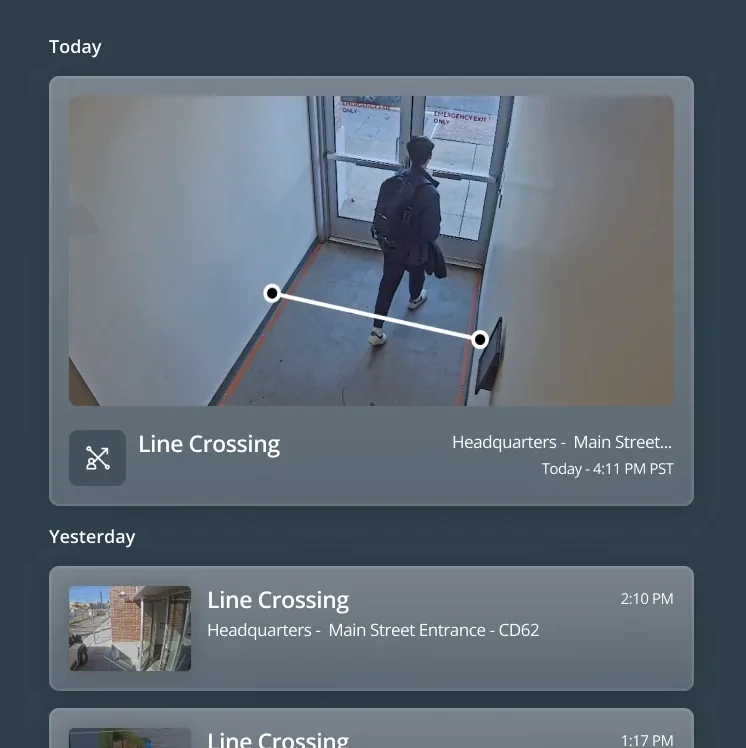
Real-time alerts handle the other half of the job. You choose the events that matter, and the alert reaches your phone or the people you name the moment it happens:
- Someone loitering near a gate or dock
- A person crossing a line you have drawn around a restricted area
- A camera being tampered with
- A camera going offline, so a gap in coverage gets caught quickly
When an alert comes in, you can open that camera from your phone and see what is happening at the dock before you decide who to call, wherever you are.

Healthcare
If you run a clinic group or a behavioral health network in the San Fernando Valley, the question we hear most is how to add cameras without exposing patient privacy. The answer comes down to where each camera points and who can watch it. We choose placement with patient areas in mind, blur faces on live and archived video where it makes sense, and set permission controls so footage reaches only the people who need it, all with your HIPAA obligations in mind. We have upgraded behavioral health networks that stayed open to patients while we worked, and because many clinic groups run several sites, we build each one to the same standard.

Manufacturing
Plants across Ventura County run long shifts, and the trouble spots are often outdoors: a fence line that goes dark after sunset, a yard behind the building, a side gate. We choose cameras with large image sensors that hold up at night and in harsh weather, and we plan fence-line and yard coverage so nobody has to wonder what happened out there. Installation works around your production schedule, not the other way around.

Logistics
Distribution sites along the Inland Empire corridor see trucks and drivers around the clock, so the question after a loss is usually who was where, and when. We cover docks, gates, and yards, and plate recognition at the gate records which vehicles came and went, so inbound and outbound movement can be traced back later.
At a distribution facility we upgraded across several locations, plate recognition at every entrance now ties each truck to its driver, so the team can trace what moved in and out.

Schools, Data Centers, Retail, and Museums
The same planning applies when your site is a campus with many entrances, a data center where a record of who entered each room matters, a store where losses hide in blind spots, or a gallery with objects that cannot be replaced. Each one asks different questions, so we start with what could go wrong there and place the cameras around the answer.

How We Plan Coverage for Your Facility
The first thing most clients ask is how many cameras they will need, and we cannot answer that honestly until we have walked the building. At Fortify, our engineers ask more questions before quoting than most integrators bother to, because your answers decide where every camera goes. Our video surveillance installation process follows four steps:
- We walk the site with you, or your facilities lead, noting entrances, blind spots, and the equipment already in place.
- We ask what has gone wrong before and what you most need to see, so the design responds to real risks.
- We lay out camera positions around how people and vehicles move through the building.
- We sequence the work around your shifts and patient hours, and on larger projects we phase it so the highest-risk areas are covered first.
That phasing lets you start with the loading dock this year and add interior coverage in the next budget cycle, and our design and engineering approach keeps every phase on one plan. Cameras are often the first step, too, because the same platform can take on your doors next. Once video is in place, access control joins it, and your team sees video and door activity in one place.
Areas We Serve
Whether you need security cameras in Los Angeles or at a second site in Ventura County, we install and support commercial systems across Greater Los Angeles, including Orange County and the Inland Empire. We are based in Van Nuys, in the middle of the San Fernando Valley, so our crews and our support team are close to the businesses we work with.
Many of those businesses, from clinic groups to production plants, run long hours along traffic-heavy routes, so we keep our crews close enough to reach a site without a cross-region drive when a camera goes offline. The people who answer your call are the same team that designed and installed your system.
